NixOS & Peer Observer on a VPS
Introduction
I've recently started contributing to the peer-observer ecosystem. peer-observer is a set of tooling developed by B10C for monitoring the Bitcoin network "for P2P anomalies and attacks using well-behaving, passive Bitcoin Core honeynodes (honeypot nodes)." This was, in part, motivated by the "call to action" put out by B10C in his post from July 2025, and the idea of forming a "Bitcoin Network Operations Collective" (BNOC):
"A loose, decentralized group of people who share the interest of monitoring the Bitcoin Network. A collective to enable sharing of ideas, discussion, data, tools, insights, and more... A place where a Bitcoin network incident could be analyzed, discussed, and ideally resolved..."
For a month or two I had been tinkering with a bit of a Frankenstein's monster peer-observer setup running on my home server, cobbled together with a pre-existing Bitcoin Core node and some Docker containers for the peer-observer stack, but had a number of issues.
Firstly, this was fragile and it was difficult to develop and test against. Secondly, my home server is on a residential CGNAT connection to the internet. As such, the Bitcoin Core node was "unreachable" and could not accept inbound connections, severely limiting the usefulness of such a peer-observer setup.
So it was obvious that I needed a more robust and production-like setup. I needed to set up an instance of peer-observer with a reachable Bitcoin Core node. And I wanted to do this on a NixOS foundation, given the pervasive use of Nix across all of B10C's projects (as well as across many other Bitcoin infrastructure projects). After asking B10C and some other members of the fledgling BNOC for recommendations, I settled on setting up a VPS on OVHcloud.
I was initially hoping to find a VPS provider that would support NixOS "out-of-the-box" but I found that this was likely to be a fool's errand as highlighted by Carl Dong in his presentation at bitcoin++ 2023 (nix-edition):
"nobody supports NixOS... VPS providers don't have first class support for NixOS".
Edouard Paris's post (Install NixOS on an OVH VPS with nixos-anywhere), which is where I found the link to the above talk, helped me understand that I could install NixOS on a VPS that initially came with another distro installed (e.g. Debian). So I provisioned an Ubuntu 25.04 VPS with the following specs:
- 6 vCores
- 12GB RAM
- 100GB SSD NVMe
This cost around US$7.32/month (~AU$11.00/month at time of writing) for 6 months prepaid. Note that 100GB is sufficient with pruning enabled and only storing a few days of logs (default is 4); if you want a full archival node you'll need significantly more storage (I'm aiming to cover this in a future post).
Installing NixOS
With my Ubuntu VPS provisioned and accessible, I began the work to set up NixOS. I more or less followed along with the earlier post (Install NixOS on an OVH VPS with nixos-anywhere).
To perform some of the operations required for nixos-anywhere, you'll need root SSH access to your VPS.
And don't make the same mistake I did in trying to prematurely lock down the VPS before you've got NixOS installed!
That is, I initially:
- Disabled password login
- Enabled SSH key-only authentication
- Changed the SSH port
But doing these things caused problems during installation - fortunately I had multiple open SSH sessions to the VPS so could intervene when necessary.
Lock down the VPS after you've installed NixOS
Establish a few SSH sessions so you can intervene if things don't go smoothly
Customising NixOS Configuration
With the barebones NixOS installed, I then set about customising the setup:
- Set up SSH key authentication
- Changed the SSH port
- Configured firewall rules to allow only necessary ports
- Set up a non-root user with sudo privileges
- Set up fail2ban - I managed to ban my IP during this process, again, multiple SSH sessions helped!
- Added Home Manager for clean separation of user-level configuration
Of course, all of this is easily done via .nix configuration files, which is one of the great strengths of NixOS.
Note that in using the flake-based remote deployment approach of nixos-anywhere, the configuration files are stored locally and pushed to the VPS when commands like the following are run from your local machine:
nix run github:nix-community/nixos-anywhere -- --flake .#<flake-ref> <root@vps-host>

nixos-rebuild switch --flake .#<flake-ref> --target-host "root@<vps-host>"
That is, you won't have .nix files where you might expect them on the VPS (e.g. /etc/nixos/configuration.nix), but rather on your local machine.
This might be a problem if you need auto-upgrades or have issues with the process (like I did!), in which case you might want to consider copying your configuration files to the VPS itself (and keep them updated as necessary).
With nixos-anywhere, the target machine (VPS) has no source configuration, it only has the built system derivation
Spinning up Peer Observer et al.
B10C has done an excellent job of providing a NixOS flake for running peer-observer instances, so much of the heavy lifting was already done for me.
Specifically, the infra-library provisions:
- A Bitcoin Core node with appropriate configuration for monitoring, e.g. built with USDT/tracepoints enabled, pruning enabled (~4GB of recent blocks retained),
- peer-observer extractors, including eBPF, RPC, P2P and log extractors,
- peer-observer tools such as logger, metrics and websocket,
- NATS Server for extractors to publish their data to, and for tools to subscribe to the data from,
- WireGuard VPN for connectivity between peer-observer instances and a central data collector (which is where Prometheus/Grafana would live in a multi-instance setup),
- age and agenix for secrets management, covered further in keys and secrets management.
The main customisations I made involved:
- Host name and user account,
- All of the secrets and key setup,
- Light vim customisation, bash aliases, etc. via Home Manager,
- Bumping Bitcoin Core to the v30.2 tag commit.
Once everything is installed and customised, we can start all of the services.
The infra-library orchestrates quite a few systemd services:
bitcoind-mainnet.service- the Bitcoin Core node, compiled with USDT/tracepoints enabledpeer-observer-ebpf-extractor.service- attaches to Bitcoin Core's USDT tracepoints via eBPFpeer-observer-rpc-extractor.service- polls Bitcoin Core's RPC for chain/mempool statepeer-observer-p2p-extractor.service- monitors P2P message trafficpeer-observer-tool-metrics.service- exposes metrics for prometheus scrapingpeer-observer-tool-websocket.service- provides real-time event streamingfork-observer.service- monitors chain tip and detects forksaddrman-observer-proxy.service- exposes address manager datanats.service- message broker connecting extractors to toolsnginx.service- reverse proxy for metrics endpointstor.service- Tor proxy for anonymous peer connections (I enabled this)prometheus-node-exporter.service- system metrics (CPU, memory, disk)prometheus-wireguard-exporter.service- VPN tunnel metricsprometheus-process-exporter.service- per-process resource usage
I use just as a command runner, so I have a justfile with commands to start, stop, restart and check the status and logs of all of the above services.
Be prepared for IBD to take a day or two, even with pruning enabled!
For more instructive details on how to set up peer-observer with NixOS in the manner I did, I'll be contributing to the peer-observer/infra-library documentation.
Keys and Secrets Management
Age was completely unfamiliar to me, so I wrote the following explanation of what it is and how it's used in the context of peer-observer deployment.
age is a simple, modern, and secure encryption tool designed to be a simpler alternative to GPG. It is used in the peer-observer deployment with agenix to manage secrets such as WireGuard keys.
More specifically, we generate a WireGuard private key on our administration/deployment coordinator machine, and then encrypt it with the SSH public keys of all deploy targets.
This generates a single .age file containing the secret encrypted for all recipients.
When deployed via agenix, each target uses its own SSH private key to decrypt and access the WireGuard private key.
This is basically the same as PGP, that is, hybrid encryption and multiple "recipients", just with different algorithms (X25519/ChaCha20 vs PGP's RSA/AES) and without all of the extra complexity of PGP (key servers, web of trust, etc.).
Multi-Instance Deployment Architecture
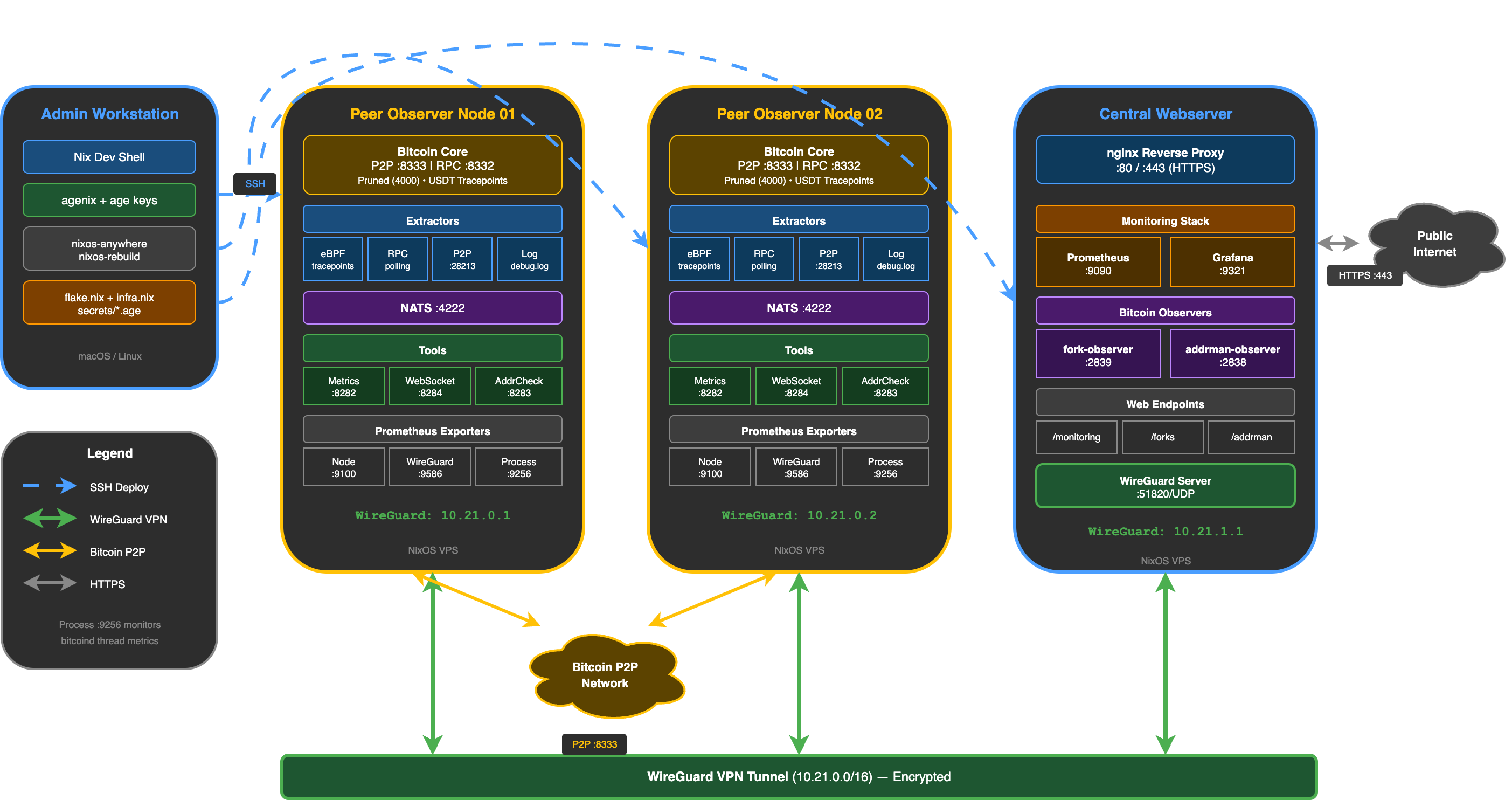
Although my setup currently consists of a single peer-observer node (with no central web-server yet), it's instructive to consider what a complete multi-node deployment might look like. Figure 1 shows a setup with two peer-observer nodes and a central web-server. Each node runs its own Bitcoin Core instance and peer-observer extractors/tools, with all nodes connected via WireGuard VPN.
Note that the extractors use protobuf to serialise and publish data to the NATS Server they are co-located with. The tools then subscribe to this data from the NATS Server. This means that in a multi-node setup, each peer-observer node is self-contained with its own NATS Server instance, and the tools on each node only see data from their local extractors. Prometheus/Grafana on the central web-server scrape metrics from each peer-observer node, and if one peer-observer node goes down or is unreachable, the rest of the setup continues to operate normally.
Resources
- Bitcoin Network Operations Collective (BNOC)
- Peer Observer GitHub Organisation
- Peer Observer Docker
- B10C - peer-observer: A tool and infrastructure for monitoring the Bitcoin P2P network for attacks and anomalies
- NixOS Wiki - NixOS friendly hosters
- Edouard Paris - Install NixOS on an OVH VPS with nixos-anywhere
- Carl Dong at bitcoin++ 2023 nix-edition - The Dark Arts of NixOS Deployments
- Quickstart Guide: nixos-anywhere
Cite this post
deadmanoz (2026). NixOS & Peer Observer on a VPS. deadmanoz.xyz. https://deadmanoz.xyz/posts/2026/nixos-peer-observer-vps (last updated 2026-09-04).